
Download FireFTP – Free Secure FTP Client for Firefox
Overview
FireFTP is a lightweight yet powerful FTP, SFTP, and FTPS client that lives directly inside the Firefox browser. By turning Firefox into a full‑featured file‑transfer workstation, FireFTP eliminates the need for a separate desktop application, letting users drag‑and‑drop files, compare directories, and even edit remote files without ever leaving their favorite web browser. The add‑on supports encrypted connections via SSL/TLS and SSH, making it a secure choice for developers, web designers, and system administrators who regularly move files to remote servers.
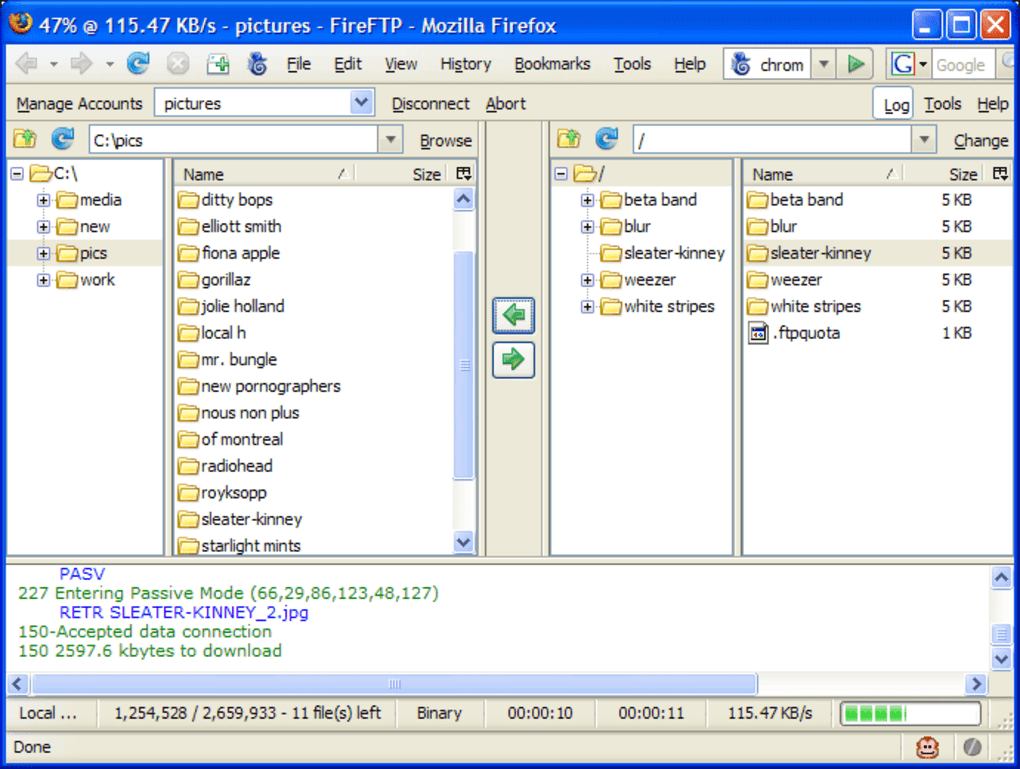
Its interface mimics Windows Explorer, which reduces the learning curve and speeds up daily workflows. FireFTP also includes a robust profile manager, allowing users to store multiple server connections with custom usernames, passwords, and default directories. While the client is praised for its speed and ease of use, occasional connection drops have been reported, especially on older network hardware.
Recent updates (up to version 1.0.5) have addressed several security concerns and compatibility issues with newer Firefox releases, ensuring a stable and secure experience for modern users.
Key Features
- Integrated FTP/SFTP/FTPS client within Firefox – no separate installation required.
- Drag‑and‑drop support for quick file transfers between local and remote directories.
- Directory comparison and synchronization while browsing – ideal for keeping local and server files in sync.
- Secure connections using SSL/TLS encryption and SSH keys for SFTP.
- Remote file editing with built‑in text editor, eliminating the need for external tools.
- Search and filter capabilities for large remote directories.
- File integrity checks and hashing (MD5, SHA‑1) to verify successful transfers.
- Profile manager to save multiple server connections with custom settings.
- Status bar displaying transfer speed, elapsed time, and estimated completion.
- Cross‑platform support through Firefox on Windows, macOS, and Linux.
Advanced Options
Beyond the basic file‑transfer features, FireFTP offers a suite of advanced tools that appeal to power users. The directory syncing feature can be set to “mirror” mode, automatically uploading new or changed files while deleting obsolete ones on the remote side. Users can also enable automatic integrity checks after each transfer, ensuring that corrupted files are identified immediately. For developers who need to test website changes, the remote editing function opens files directly in the default code editor, allowing instant updates without a separate download‑edit‑upload cycle. Finally, the add‑on’s open‑source nature means that community contributors can add custom scripts or enhancements, extending its functionality even further.
Installation, Usage & Compatibility
Installing FireFTP is straightforward. Open Firefox, navigate to the official Mozilla Add‑ons page, and click “Add to Firefox.” After confirming the permissions, the add‑on appears as a new toolbar icon. Clicking the icon opens the FireFTP pane, which resembles a classic two‑panel file manager. To connect, click “Create New Site,” fill in the host, port, protocol (FTP, SFTP, or FTPS), username, and password, then save the profile. Subsequent connections can be made with a single click on the saved profile name.
Once connected, the left panel displays your local file system while the right panel shows the remote directory. You can navigate either pane, use the built‑in search bar to locate files, or right‑click for context actions such as “Upload,” “Download,” “Rename,” and “Delete.” Dragging a file from the left to the right initiates an upload, and vice‑versa for downloads. For bulk operations, select multiple items with Shift or Ctrl (Cmd on macOS) and choose “Synchronize” to keep both directories identical.
FireFTP runs on any operating system that supports Firefox, including Windows 10/11, macOS 10.15+ and Linux distributions such as Ubuntu, Fedora, and Debian. Because it is an extension rather than a standalone program, it inherits Firefox’s security updates and sandboxing features, providing an extra layer of protection against malicious servers. The add‑on is regularly updated to stay compatible with the latest Firefox releases, and the 1.0.5 patch specifically addressed connection stability on Linux kernels and improved i18n number formatting for non‑English locales.
Pros, Cons, FAQ & Conclusion
Pros
- Completely free and open‑source.
- No separate installation; works directly inside Firefox.
- Supports secure protocols (SFTP, FTPS) for encrypted transfers.
- Rich feature set comparable to dedicated desktop clients.
- Cross‑platform compatibility via Firefox.
- Profile manager saves time for frequent connections.
Cons
- Occasional connection drops on unstable networks.
- Dependent on Firefox; if the browser is closed, the client is unavailable.
- Interface may feel dated compared to modern cloud‑based file managers.
- Limited support for large‑scale batch scripting.
Frequently Asked Questions
Is FireFTP still maintained?
Yes. The latest release (1.0.5) includes security patches, compatibility fixes for Firefox 115+, and bug resolutions for Linux users.
Can I use FireFTP on macOS?
Absolutely. As long as you have Firefox installed on macOS, FireFTP works the same way as on Windows or Linux.
Does FireFTP support SFTP key authentication?
Yes. You can configure an SSH private key in the connection profile for password‑less, secure authentication.
Is there a limit to the size of files I can transfer?
FireFTP does not impose its own file‑size limits; the restriction depends on the server and the underlying FTP/SFTP protocol.
How secure is the data transferred with FireFTP?
When using FTPS or SFTP, all data is encrypted end‑to‑end, providing the same level of security as dedicated desktop clients.
Conclusion & Call to Action
FireFTP delivers a surprisingly comprehensive FTP experience without leaving the Firefox browser. Its blend of free, open‑source licensing, secure protocol support, and a familiar file‑manager layout makes it an excellent choice for developers, designers, and IT professionals who value speed and convenience. While occasional connection hiccups can occur, regular updates have mitigated most stability concerns. If you’re looking for a no‑cost, secure, and integrated solution to manage remote files, download FireFTP today and streamline your workflow directly from your favorite web browser.







